Inside Sonder

One requirement.
A connected desk.

From the client's first brief to the paid invoice. Follow the work, explore the real screens, and see where your judgement comes in.

The requirement-to-invoice workflow

Nine stages. Nothing disconnected.

Choose a stage. Switch between the recruiter's workspace and the pages your clients see.

01 / 09

01Intake

The requirement arrives already understood.

Each client gets a private link. They paste a JD, Sonder reads it straight away and asks only what the JD left open: budget, notice period, work mode, must-haves against nice-to-haves. An editable brief keeps required skills and experience together, with a screening question bank for the same job.

New requirementssonderai.in
Client-submitted requirements arrive with follow-up questions answered and a pool-readiness check (sample data)
Submit a requirement · private linksonderai.in
The client's private link for submitting a requirement to the agency (sample data)
Jobs · Briefsonderai.in
The Brief tab: the client's JD parsed into must-haves, nice-to-haves and the recruiter's own directives (sample data)

Real product screens · sample data, all fictional.

What arrives, and what your client sees

What you get

  • It lands in a review queue, never straight into live jobs.
  • The parsed role, the skills and the client's answers sit together.
  • Accepting creates the job, with the answers as constraints.
  • The New requirements queue shows what Sonder asked, what the client answered, and who you already have.

What your client sees

  • A clean page under your agency's name, with no login.
  • Fields for the JD, the budget or CTC band, the longest notice they can accept, work mode and when the shortlist is needed.
  • Follow-up questions, then confirmation that the requirement reached a person.

The client never sees your pool, your other clients, or your pipeline.

02Pool readiness

You find out who you already have.

Before you accept a requirement, Sonder scores your existing pool against it the same way it scores a job, for example “7 in the pool, 3 strong”.

Jobs · Sourcesonderai.in
Before searching Resdex, Sonder shows who in your own pool already fits the role (sample data)

Real product screens · sample data, all fictional.

Rediscovery and reverse matching

What you get

  • A count of strong and possible fits, with the top few names.
  • Rediscovery pills from past history: who was seen for other roles, and who was passed before.
  • Reverse match: open any candidate and see which of your open roles they fit.

Before re-sourcing, check the people already in your pool.

03Sourcing

Two ways candidates reach you.

Your careers and apply pages bring people to you. Search strings and the Resdex side panel help you go out and find them. Either way, every profile waits for a person to say yes.

Jobs · Search beyond the poolsonderai.in
Ready-to-paste Resdex keyword lines and Boolean search strings generated from the JD (sample data)
Chrome · Sonder side panelSide panel
The Sonder Chrome side panel beside Resdex: fills your search, then ranks the visible results before you spend a CV view (sample data)

Real product screens · sample data, all fictional.

Sources, imports and recruiter control

What you get

  • Public apply pages per job, or a general talent-pool page, with consent captured at the moment of collection. Applicants land in your review inbox and spend no Resdex credits.
  • Keyword and Boolean strings written from the JD, each with a 200-character counter and a copy button.
  • A Chrome side panel beside the Resdex tab you opened: pick the job, fill the form, run your search, then rank the page you're reading before you export.
  • CV upload for PDF, DOCX and TXT. Duplicates are matched by email and phone, with Indian number formats normalised.

Worth knowing

  • Every step in the side panel is your click, on your own account.
  • The side panel is installed by hand; it is not on the Chrome Web Store.
  • Screening an uploaded Resdex export needs a paid plan.
  • The pool radar flags rows that look like people you already have. It is a sighting, not a fact.

You choose which sources and imports to bring into the pool; review the preview before saving.

04Screening

A ranked shortlist with its reasoning attached.

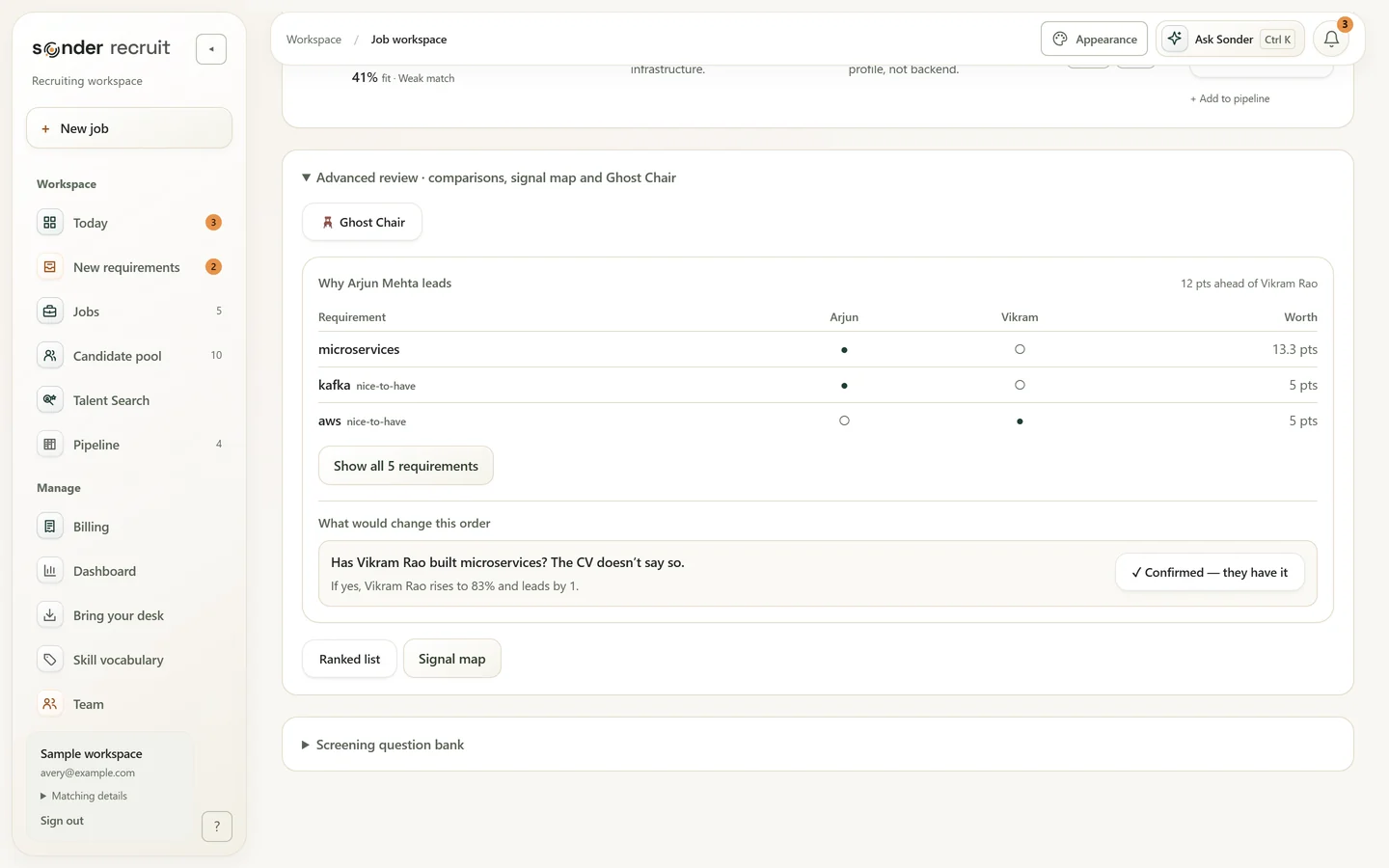
Candidates are ranked across must-have skills, role match, experience and nice-to-haves. Reviewed skills show their supporting CV lines; rows still awaiting that check say “evidence pending”. Open the full candidate read, then choose Keep or Pass yourself.

Jobs · Reviewsonderai.in
Ranked shortlist: each candidate shows a fit score, one line of CV proof, the main gap and a keep-or-pass decision (sample data)
Candidate · Arjun Mehtasonderai.in
Candidate detail: the 82% score broken into skills, experience and role match, with strengths and the gap to probe (sample data)
Jobs · Review · why the ordersonderai.in
Sonder explains why the top candidate leads, requirement by requirement, and what would change the order (sample data)

Real product screens · sample data, all fictional.

Evidence, score updates and limits

What you get

  • One ordered list instead of forty open tabs.
  • The exact CV lines, so you can disagree.
  • A requirement-by-requirement evidence table for candidates worth a closer look.
  • Screen the whole pool against one job, or against up to 20 active jobs at once, with live progress.

Worth knowing

  • Full evidence covers the top 40 per screen by default. Rows beyond that say “evidence pending”.
  • If the brief, the candidate or the rules change, the score is flagged for a re-screen before it can be shared.
  • Upload the full CV and the candidate is re-scored from the real document.

“The score is a starting point for your judgement, not a replacement for it.”

05Client review

Send a shortlist, get real feedback back.

Share a private, revocable link instead of a PDF. Names and contact details stay hidden. The client answers Yes, Maybe or Pass with a note, and each verdict lands back in your pipeline.

Jobs · Deliversonderai.in
Deliver: a live, anonymised client link, exports, and the client's Yes/Maybe verdicts flowing back (sample data)
Shortlist · shared linksonderai.in
The client's anonymised shortlist: ranked candidates with evidence and Yes, Maybe or Pass buttons (sample data)

Real product screens · sample data, all fictional.

Sharing, feedback and exports

What you get

  • “Client opened it”, with the last date, or “Not opened yet”. Your own preview doesn't count.
  • Feedback labelled by source: the shortlist link or the client portal.
  • Ghost Chair challenges the shortlist the way a client would before it goes out: notice against the deadline, CTC against the budget, people this client already passed on. Every flag cites its evidence.
  • A branded client PDF and Excel, plus an ATS-import CSV for Zoho Recruit, Keka or BambooHR.

What your client sees

  • A page under your brand with a ranked, anonymised card per candidate.
  • Rank, title, years, a fit ring, the verdict and strengths.
  • “Evidence · 3 of 3 matched skills verified from the CV”, or “Evidence pending”.
  • Yes, Maybe or Pass, with an optional note. Nothing else of yours.

Verdicts nudge your workspace's per-skill scoring: capped, visible and reversible. Revoke the link at any time.

06Interviews

The pipeline stops living in your head.

Track each candidate per job through dated stages: internally selected, interview scheduled, L1 cleared, final interview, approved by client, onboarded. Add your own rounds, such as “L2 Technical” or “Client Panel”.

Pipeline · Arjun Mehtasonderai.in
Interview stages with dates and times that flow into your calendar feed (sample data)
Dashboard · Coming upsonderai.in
A 14-day agenda of interviews, joinings and deadlines, with one click to subscribe from any calendar app (sample data)
Ask Sonder · upcoming interviewssonderai.in
Ask Sonder listing upcoming interviews with dates and times (sample data)

Real product screens · sample data, all fictional.

Stages, scheduling and contact history

What you get

  • A shared view of who is at which stage, grouped by client account.
  • Time between stages.
  • Interviews, joinings and deadlines in your own calendar through a feed that updates itself. No sign-in to connect.
  • A “Coming up · next 14 days” agenda.
  • A contact log: “called, no answer” in two clicks, so the team sees who has been reached.

One feed, any calendar

  • Google Calendar
  • Outlook
  • Apple Calendar

Interviews, joinings, keep-warm touchpoints and deadlines. Regenerating the link revokes the old one.

07Offer to joining

The gap where placements quietly die.

Once an offer is accepted, Sonder schedules the keep-warm touchpoints across the notice period: congratulations, resignation check, mid-notice counteroffer check, documents and BGV, a pre-joining call, then day-before and joining-day confirmation.

Priya Nair Offer accepted

Northwind Systems (sample) · accepted Mon 14 Sep · joins Mon 16 Nov

  1. Congratulations

    Mon 14 Sep · Done

  2. Resignation check

    Thu 17 Sep · Done

  3. Mid-notice counteroffer check

    Fri 2 Oct · Due today

    Prefilled WhatsAppAdd to Google Calendar
  4. Documents and BGV

    Mon 19 Oct · Scheduled

  5. Pre-joining call

    Mon 9 Nov · Scheduled

  6. Day-before and joining-day confirmation

    Sun 15 Nov · Mon 16 Nov

Joining risk

Watch

The counteroffer check is due today and nobody has spoken to Priya since 17 Sep.

Interactive example rebuilt from the product · sample data. Try “Mark done”.

Documents, touchpoints and joining risk

What you get

  • Each touchpoint has a prefilled WhatsApp message, Add to Google Calendar, copy, done or skip.
  • A joining-risk read that names its reason.
  • Every contact is logged.
  • A private checklist link for joining documents. Files are encrypted before storage, identity documents are owner-only to download, and every download is logged.
  • Offer letters from your own template, on your letterhead.

“This is the difference between a placement and an almost-placement.”

08Money

The fee is tracked like it matters.

Record the fee percentage, invoice and guarantee window for each placement. Sonder works out the fee and the guarantee end date from the CTC and joining date.

Billing · GST invoicessonderai.in
Client invoicing: GST invoices with who has paid and who is overdue (sample data)
Dashboard · Revenuesonderai.in
Revenue from real placements: fees realized, invoiced, still to bill, and guarantee windows (sample data)

Real product screens · sample data, all fictional.

Fees, guarantees and invoices

What you get

  • Earned, billed and still-to-bill at a glance.
  • Guarantee windows counting down.
  • Revenue by month from real placements.
  • GST tax invoices (SAC 9985, 18%, IGST or CGST+SGST) in one click from a joined placement. Numbering is consecutive and a number is never reused.
  • Overdue invoices show up on Today's radar.

Sonder raises the invoice; your books stay in Tally or Zoho.

09Proof

A monthly report your client can read.

One branded PDF per client per month: submittals, interviews, offers, placements and fees. Names appear only for candidates the client has already met.

Dashboardsonderai.in
Dashboards: the master Excel, what the engine learned from your feedback, and the live pipeline funnel (sample data)

The report page is rebuilt for this tour; Dashboards is a real screen · sample data, illustrative figures.

Reports, privacy and the dashboard

What you get

  • The document that justifies your invoice, without you assembling it by hand.
  • Your agency's logo and your client's logo on the page, with a quiet “Powered by Sonder” footer.
  • Dashboards for your side of the desk: stage funnel, outcomes, days between stages, recruiter workload and what Sonder has learned from your thumbs-up and thumbs-down.
One role · Brief → Source → Review → DeliverTry the sample match
Try it here · no login

Try the part that changes the shortlist.

One JD. Five fictional candidates. Run this scripted example, then select a person to read the evidence behind their rank.

The requirement, as a client sent it

Senior Backend Engineer — Payments

Cedar Labs (sample) · Bengaluru or Hyderabad · hybrid

5 to 9 years building backend services in Java and Spring Boot. Has designed and run microservices in production. Kafka and AWS are a plus. Notice period of 30 days or less.

The ranked shortlist appears here.

Sample data: fictional candidates, authored scores. The 40 · 30 · 20 · 10 weights are the ones published on How scoring works.

Between the milestones

Start with what needs you.

A desk spans more than one role. Keep today's priorities, your team's handoffs and the next conversation in view.

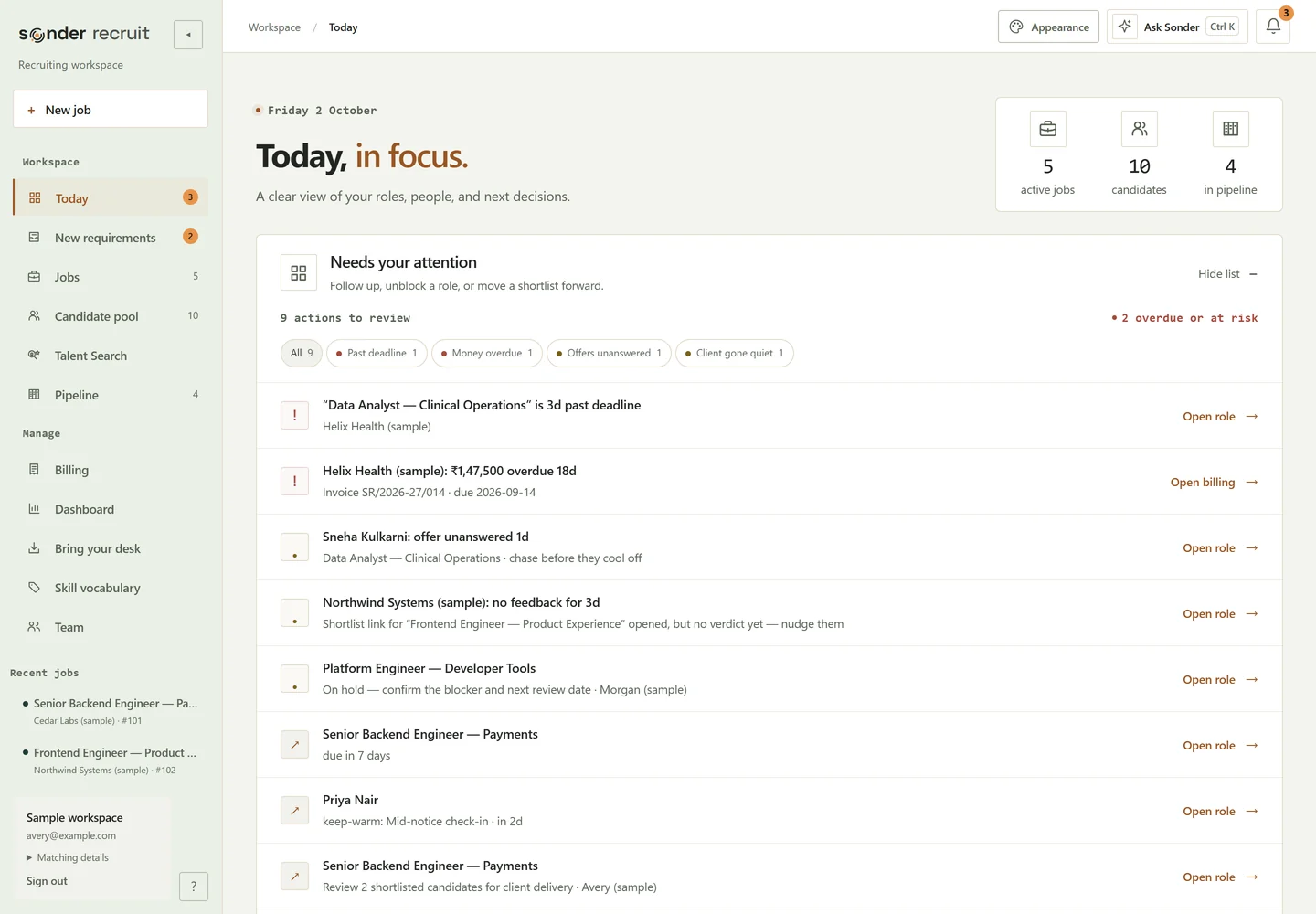
Your next move, already surfaced.

Today shows the roles that need candidates, the screening that needs refreshing and the shortlists waiting for a decision or delivery. Every item carries its reason and a button that opens the role.

Workspace · Todaysonderai.in
Sonder Recruit's Today screen: a ranked list of what needs your attention, from an overdue requirement to an unpaid invoice (sample data)

Your whole desk, one question away.

Press Ctrl K or ⌘K anywhere and pick a question such as “who owes us money”. Every answer card is a real record from your workspace: invoice sums, pipeline dates, ledger rows.

Ask Sonder · Ctrl Ksonderai.in
Ask Sonder answering 'who owes us money' from billing records, with each invoice listed (sample data)

Real product screens · fictional sample data. Ask Sonder uses suggested questions answered from your records.

A shared desk, clear access.

Owners invite members, control roles and disable access without erasing the work history.

The next conversation.

A 14-day agenda brings interviews together. Waiting-day nudges flag work for your attention; they never auto-send.

Find the pool again.

Save text or semantic pool searches, return to them, and carry a candidate's past roles and feedback forward.

The memory around the work

The desk remembers.

Decisions, relationships and the reasons behind them stay connected as the work moves on.

01Remember the relationshipHistory that stays with the client and candidate.

Decision ledger

Every stage call, drop reason, offer, client verdict and data-path change is recorded in an append-only ledger. Add the “why” afterwards.

Client memory

Verdict rates, response lag, where pipelines stall and the skills each client actually accepts, with the decisions behind every claim. Patterns appear after about six client decisions.

Seen before

Before you save a CV, Sonder shows when the person joined your pool, which roles they were screened for, past drops and past client feedback.

Candidate timeline

Every candidate is a whole story: screenings, verdicts, stages, offer milestones, keep-warm touches and the invoice on one timeline.

02Learn the language of your deskVocabulary and review context your team can inspect.

Skill vocabulary

Teach Sonder your team's and your clients' own words. Map “k8s” to Kubernetes once and every JD and CV understands it.

Review intelligence

Why #1 beats #2, a signal map of evidence against relevance, and “Is the brief the problem?”: re-screens with one requirement relaxed at a time. No AI, real numbers.

03Make the work your ownBring your records, keep the workbook, use your letterhead.

Bring your desk

Your desk tracker, JD files, a CV folder and candidate exports, each previewed before saving. On Plus, Pro and Enterprise; the trial starts fresh. See the four import paths →

Master Excel

A workbook generated from live data, with Summary, Accounts, JDs, Pipeline, Placements and Timeline sheets and real Excel formulas.

Your letterhead

Your agency's logo and your clients' logos on every shortlist, monthly report, offer letter, tax invoice and public page.

Make it yours

A desk that feels like yours.

Four workspace styles, each in light and dark, plus a warmth slider. In your workspace, Sonder remembers your choice in this browser. The buttons below preview the real desktop styles.

Workspace · Today · Glass stylesonderai.in
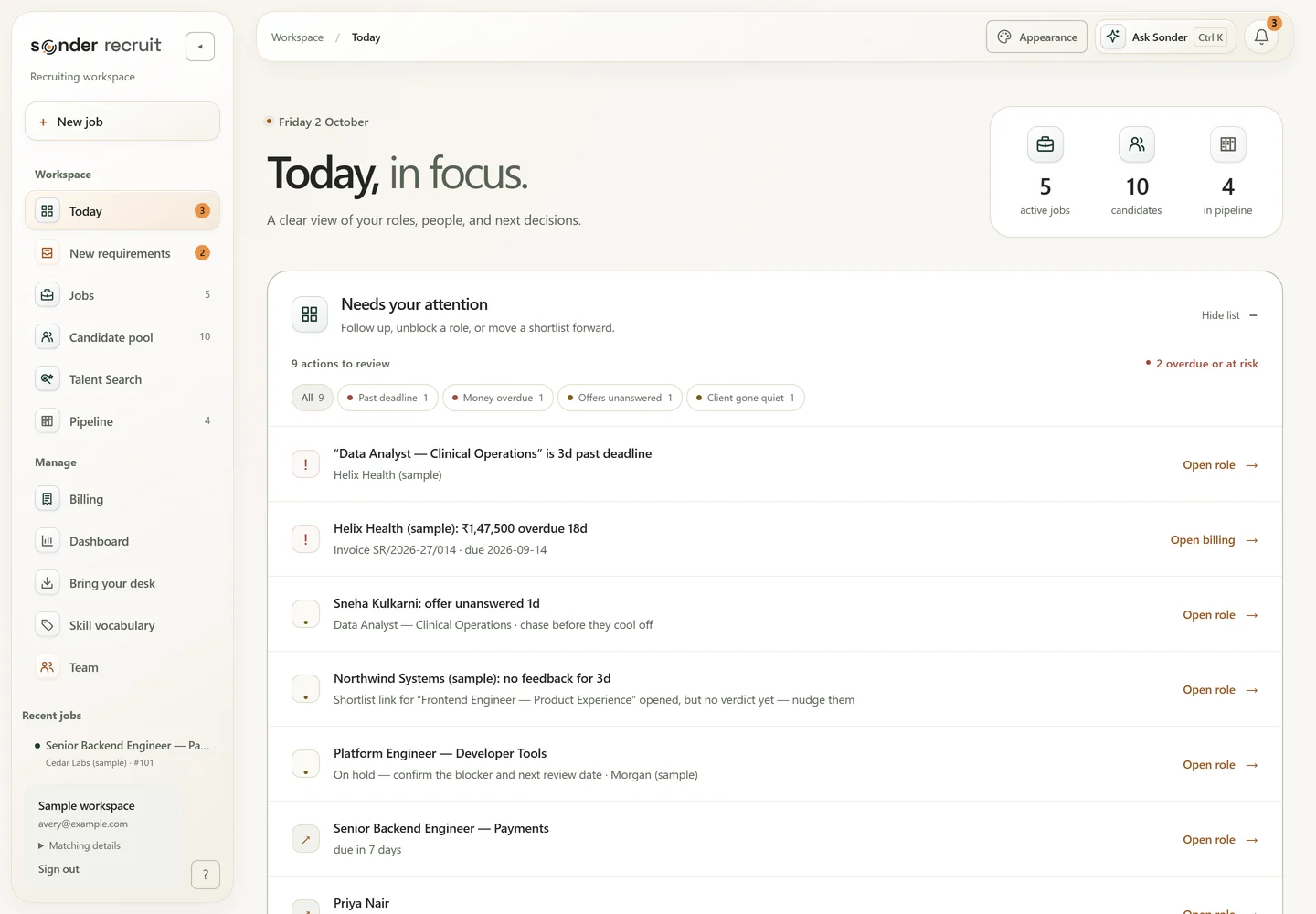
Today in the Glass workspace style (sample data)

Glass

Light, depth and a little possibility. Liquid glass surfaces over a soft warm field.

Workspace · Today · Studio stylesonderai.in
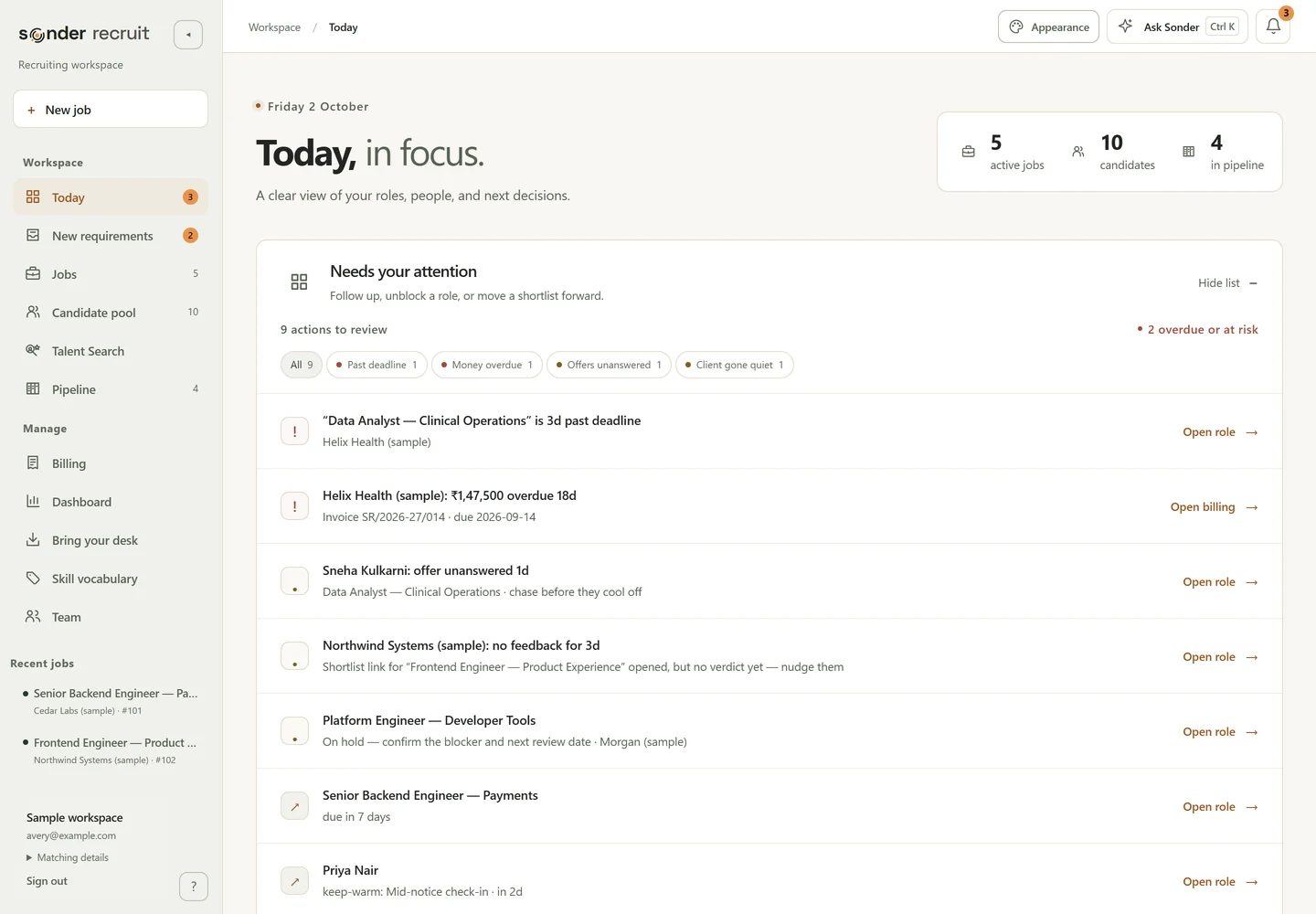
Today in the Studio workspace style (sample data)

Studio

A clear space for focused work. Flat, quiet panels with nothing competing for attention.

Workspace · Today · Editorial stylesonderai.in
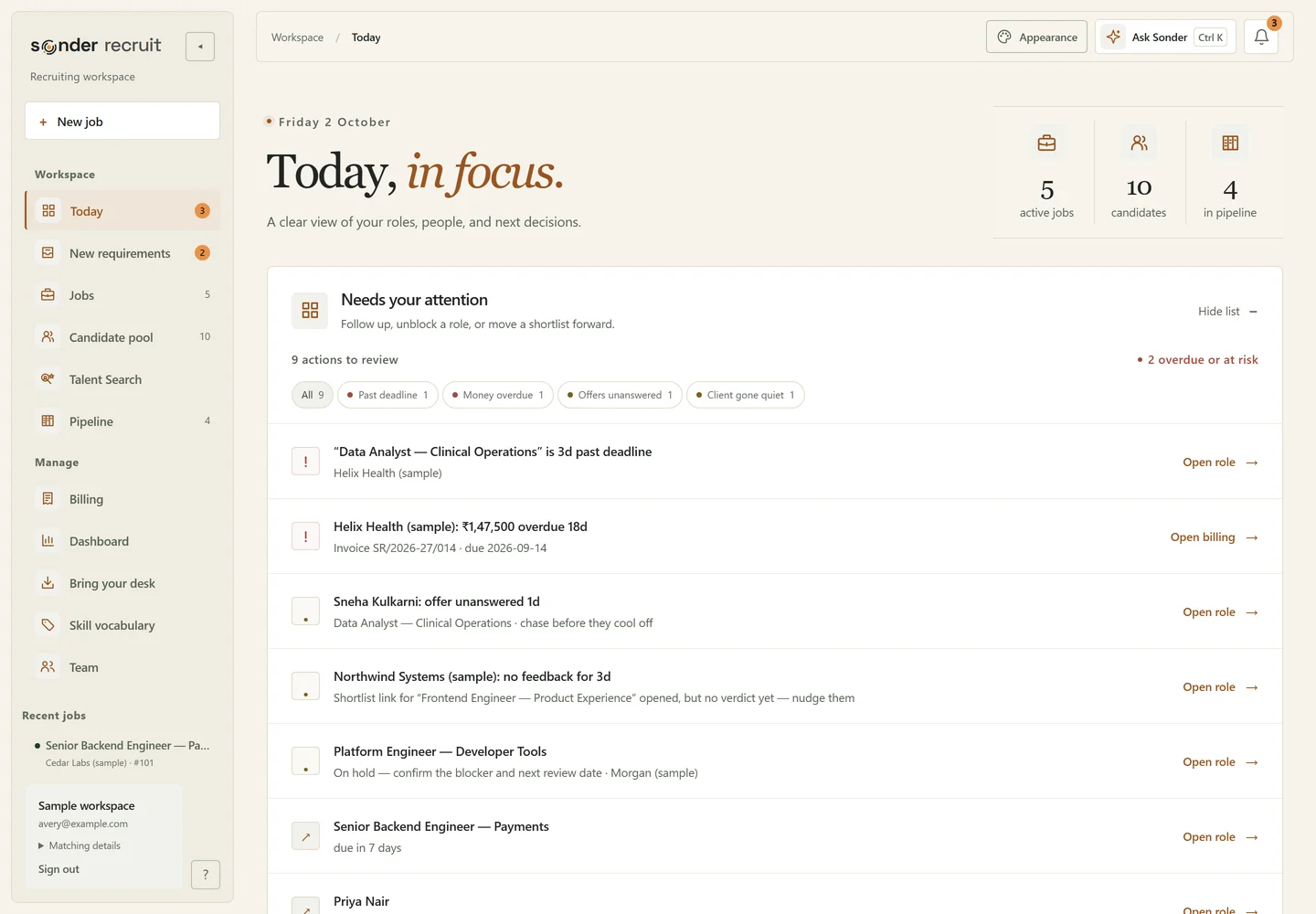
Today in the Editorial workspace style (sample data)

Editorial

Warmth, character and considered detail. A serif headline and an italic accent, like a well-set page.

Workspace · Today · Signal stylesonderai.in
Today in the Signal workspace style (sample data)

Signal

Quiet intensity. Everything in focus. Mono labels and sage accents for a desk that reads like an instrument.

Real workspace styles · desktop detail views · sample data.

Boundaries

What Sonder deliberately does not do.

The lines the product holds on your behalf, whichever plan you are on.

You send recruiting outreach yourself.

Outreach starts as a draft you read and edit. Gmail, Outlook and WhatsApp open with the message prefilled. You choose when to send it, one candidate at a time.

It does not scrape job boards.

The side panel assists inside a tab you opened, on searches you run, on your own account.

It does not decide who to reject.

Scores order your attention. There is no auto-reject, no auto-advance and no hiding. Every call about a person stays human.

Read privacy & security

See it against your own roles.

Start a fresh workspace. Add a requirement. See the whole process in one place.

14 days free. No credit card required.